Feature walkthrough
Savings & Rewards
Watch the money you used to spend on cigarettes build up, then aim it at something you actually want, with a photo so the goal stays concrete.


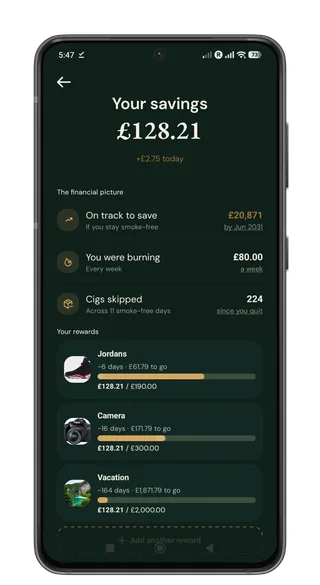
Every cigarette you skip has a price attached. Quit It keeps a running total of what that adds up to, how much you used to burn through in a week, and what you are on track to keep if you stay smoke-free.
Then you can point that money at something real: trainers, a camera, a trip. Add a photo of the reward so it is sitting there on the screen while the bar fills. On a hard day, a number with a picture attached is often easier to hold onto than a vague promise to yourself.
How This Helps
- See what you have saved so far and what that looks like further out if you keep going.
- Know what you were spending before, so the new total has something honest to compare against.
- Set rewards with photos and watch progress toward each one as the savings grow.
Practical Tips
- Update your cigarette cost and usage in settings so the total matches your real spend.
- Pick rewards you would actually buy. A photo of the thing helps more than a blank target.
- Open savings during a craving. Seeing how close you are to the next reward can be enough to wait it out.
When It Helps Most
When motivation dips, when a craving hits, or whenever you need a concrete reason to keep the streak going.
- Live savings and weekly spend you used to burn
- Longer-range projection if you stay smoke-free
- Rewards with photos and progress bars
- Totals based on your real cost and usage
Your next smoke-free choice starts here.
Set up your reason, track what actually happens, and let every small win count toward a cleaner pattern.